
There are many social media platforms to watch videos but if you find some valuable videos YouTube is one of the best platforms in the digital world.
YouTube is also the biggest search engine after Google. Thousands of type of categories of videos are available on YouTube some are given below.
- Entertainment
- Education & Tutorials
- Gaming
- Vlogs
- Technology & Gadgets
- Beauty & Fashion
- Health & Fitness
- Food & Cooking
- Travel
- Business & Finance
In today’s fast-paced digital world, time is a valuable asset for everyone. However, the challenge lies in the fact that social media platforms are designed with algorithms that prioritize user engagement, often leading to increased time spent on these platforms.
In this article, I will show you how to see how much time you watch content or videos on YouTube. Step by step with a screenshot.
Steps to See Watched Time on YouTube
If you want to see how much time you watch videos on YouTube in total hours you need to follow this step-by-step guide.
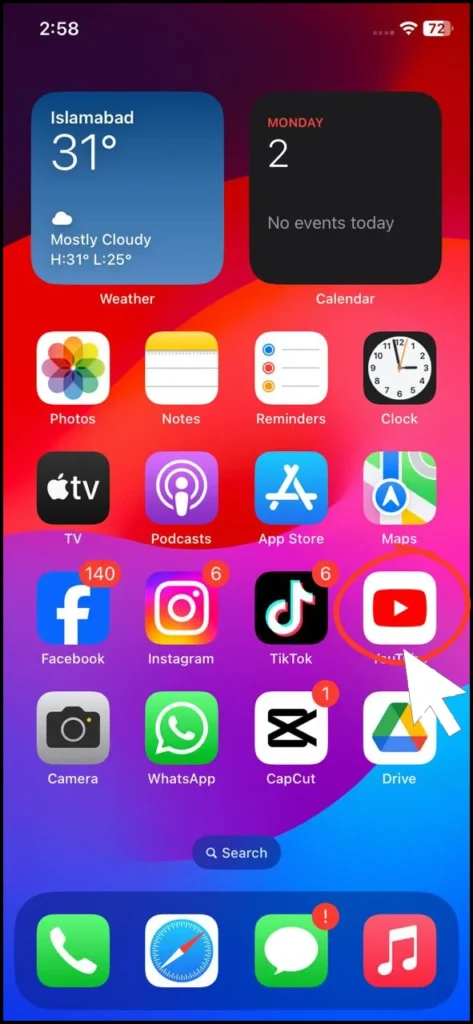
Step 1: Open YouTube
First, you need to open the YouTube App on your Phone or Mobile and please update to the latest version from the Google Play Store if you use an iPhone go to the apps store and update other options that are not available in the old version of YouTube.
Step 2: Go To Account
Click on your YouTube Profile or account.

Step 3: Time Watched
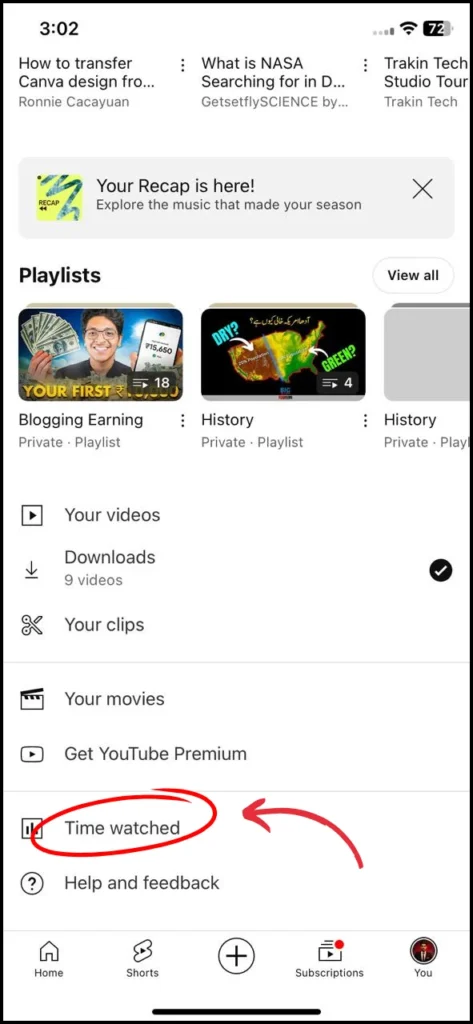
Scroll down and click on the second last option which is “Time Watched” All details are available in this option.
Step 4: See All Data
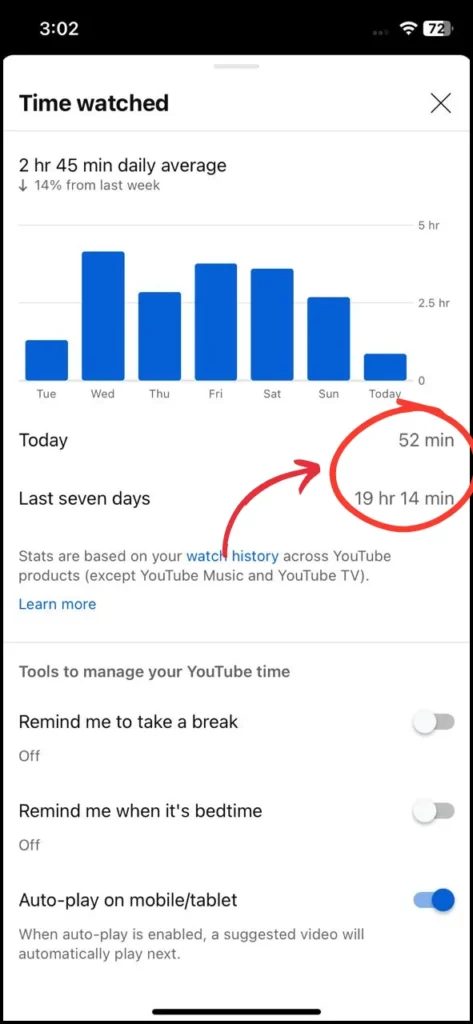
All details are visible you can see all data on this page In my case I watched YouTube 19 + Hours in the last seven days and today is just 52 minutes.
Step 5: Set Reminder
If you want to YouTube send reminders or notifications about your watch time you need to on this option and set the time according to you in my case I set 1 hour.
When I use YouTube above 1 hour YouTube opens a popup and sends me a reminder.
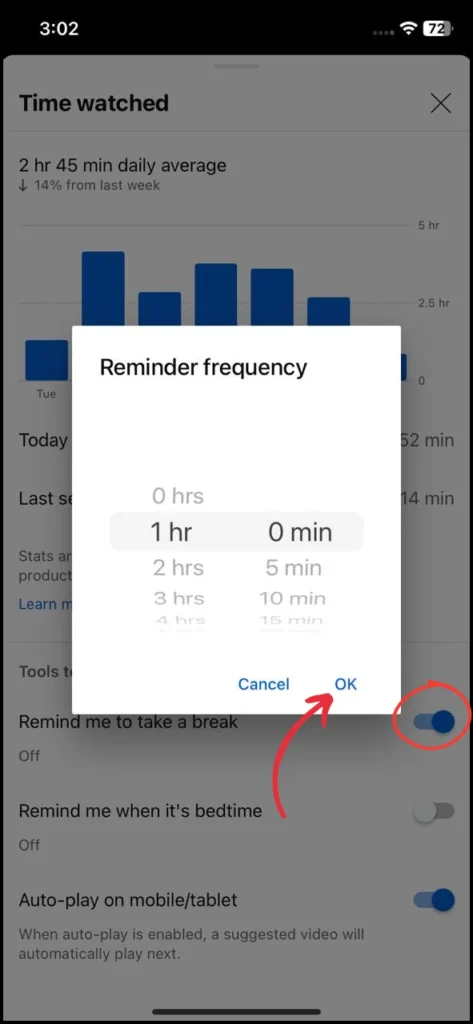
All the steps are very easy you can also do the same step on your phone in this case I use an iPhone but all steps are the same in Android phones as well.
Related Content
- Top 5 Ways To Earn Money From YouTube Without AdSense
- Top 5 YouTube Gurus in India You Must Follow as a Content Creator in 2024
FAQ’s
Q1: How do I see how many hours watched on YouTube?
Go to the account scroll down and click the time watched option.
Q2: How to get watch hours on YouTube?
To increase watch hours on YouTube:
- Create engaging, high-quality content that keeps viewers interested.
- Optimize video length to balance depth and viewer retention (10-15 minutes is often effective).
- Encourage viewers to watch the entire video by using hooks, engaging thumbnails, and maintaining a steady pace.
- Organize content into playlists to keep viewers watching multiple videos.
- Promote your videos across social media and other platforms to reach a wider audience.
Q3: How to check your watch history on YouTube?
Go to the YouTube app or website, click on the “Library” tab, and then select “History.” all history is visible that you watched already.
Conclusion
Keeping track of the time you spend watching videos on YouTube is essential for managing your digital well-being. By following the step-by-step guide provided, you can easily access and monitor your watch time statistics directly from the YouTube app.
This awareness allows you to make informed decisions about your screen time, helping you to maintain a balanced and healthy relationship with digital content.
Whether you’re looking to cut down on your viewing habits or simply stay mindful of your usage, knowing how to track your watch time is a valuable skill in today’s digital age.