
As you know YouTube is one of the biggest search engines after Google and also the biggest video platform there are millions of channels on YouTube and billions of videos are uploaded on YouTube according to the data of 2024 3.7 million videos are uploaded every day on YouTube.
Some videos are public some are unlisted and some are private if you want to learn the basic differences between public, unlisted, and private please read this complete article I will show you step by step.
1. Public Videos on YouTube
A public video on YouTube is accessible to everyone on the platform. It can be discovered through search results, recommendations, and browsing, making it visible to a broad audience.
Public videos can also be shared widely, embedded on websites, and posted on social media. For creators, public videos are eligible for monetization through ads if they are part of the YouTube Partner Program, allowing them to earn revenue based on views and ad interactions.
These videos typically enable comments, likes, and dislikes, fostering viewer engagement and discussion. Additionally, public videos can benefit from YouTube’s algorithm, which may promote them to more users if they perform well, leading to increased visibility and potentially higher view counts.
Creators can also monitor the performance of their public videos through YouTube Analytics, gaining insights into metrics like views, watch time, and audience demographics.
How to Upload Public Videos
When you upload any type of video on YouTube it is by default in public you do not need to change settings for public videos.
2. Unlisted Videos on YouTube
An unlisted video on YouTube is a type of video that is not publicly visible on the platform and cannot be found through search results, recommendations, or a user’s channel page. However, the video can still be viewed by anyone who has a direct link to it.
Unlisted videos are often used when the creator wants to share content with a specific group of people without making it fully public.
For example, they might be used for sharing private updates, sending a video to a limited audience, or distributing content not intended for general public viewing. While unlisted videos don’t appear in YouTube searches or suggestions, they can still be shared and embedded by anyone who has the link. Additionally, unlisted videos can be included in playlists and embedded on websites.
They also allow for comments and engagement just like public videos, provided the viewer has access to the video link. Despite being less visible than public videos, unlisted videos are still accessible and can be shared widely if the link is distributed.
How to Upload Unlisted Videos
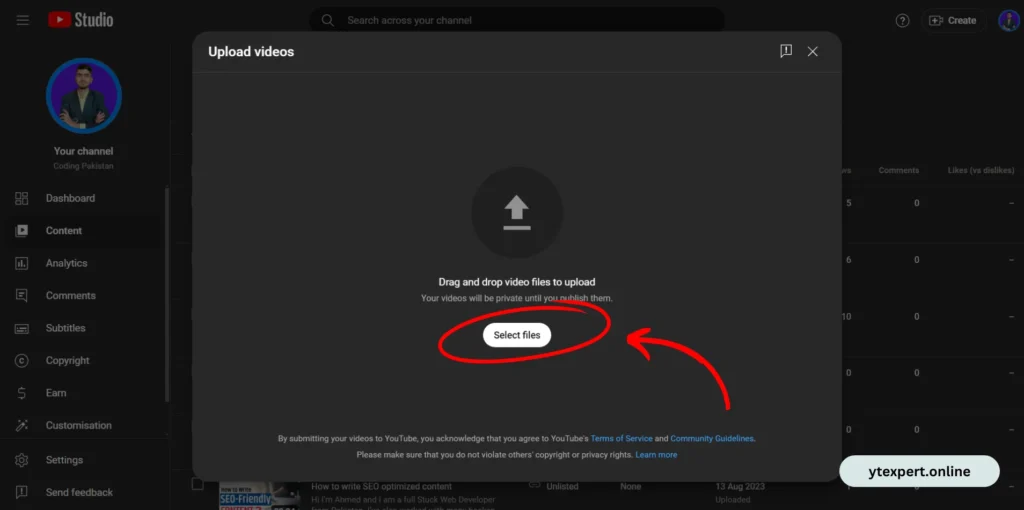
Step 1: Log in to your account go to the channel dashboard click the create button then upload a video that you want to be unlisted.
Step 2: When the video is uploaded 100% go to the visibility tab here you see three options public, unlisted, and private select the unlisted option.
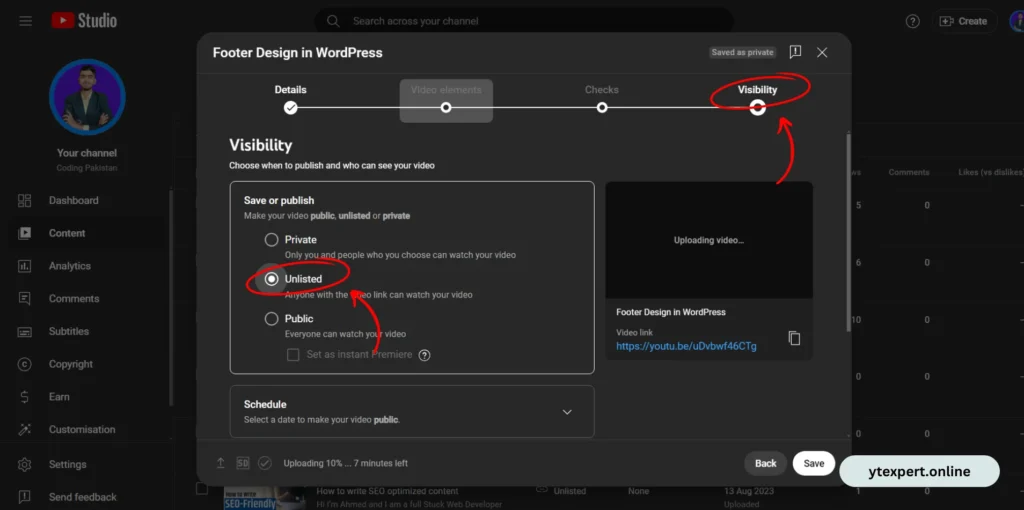
I also attached a screenshot for a better understanding
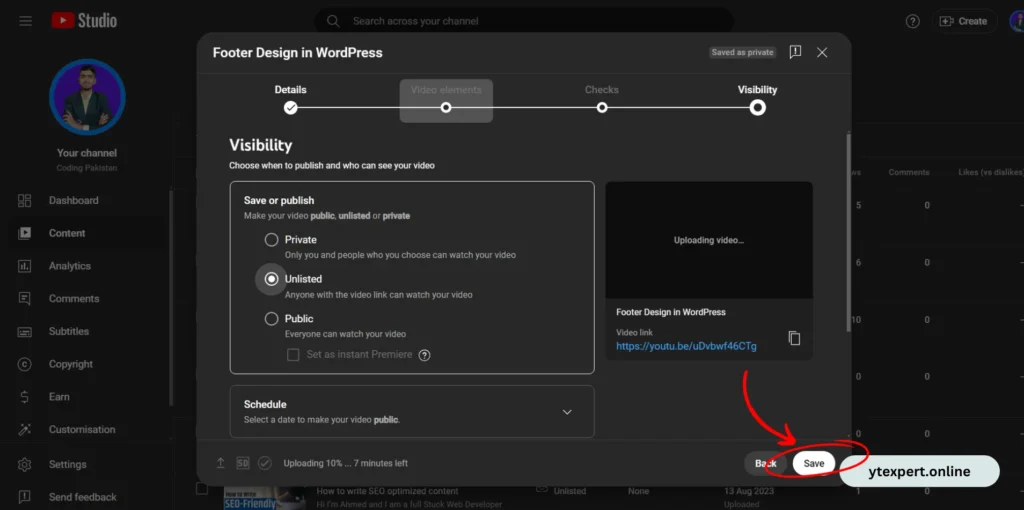
Step 3: After the setting is set up then click on the save button your video is unlisted now you can copy the link and send everyone you want.
Private Videos on YouTube
A private video on YouTube is a type of video that is completely hidden from the public and cannot be viewed by anyone except the creator and the specific users they choose to share it with. Unlike public or unlisted videos, private videos do not appear in YouTube search results, recommendations, or on the creator’s channel page. They are only accessible to users who are explicitly invited via their Email Address, and even those users must be signed in to their Google account to view the video.
Private videos are often used for content that is intended to be kept confidential, such as personal recordings, early drafts of videos, or content meant only for a select audience. They can also be used for internal company training videos, private family videos, or other sensitive material.
Since private videos are not shared widely, they do not allow for comments, likes, or dislikes from viewers. The only interaction possible is between the creator and the specific individuals they’ve granted access to. This level of control makes private videos a secure way to share content with a very limited and specific audience on YouTube.
How To Upload Private Videos
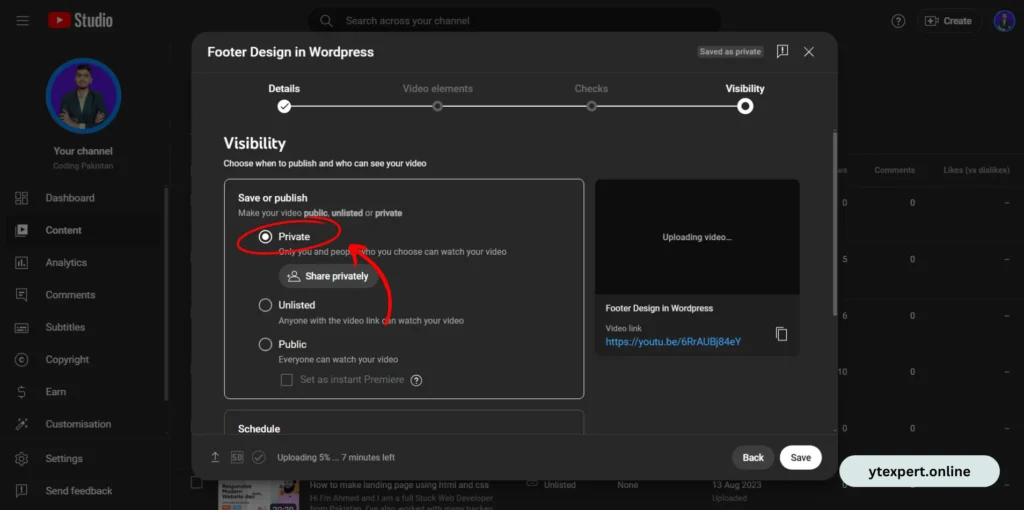
Step 1: All the steps are the same as shown in the unlisted video option but one thing is different when you upload a video and set all the details go to the Visibility tab and select the private option as shown in the given screenshot.
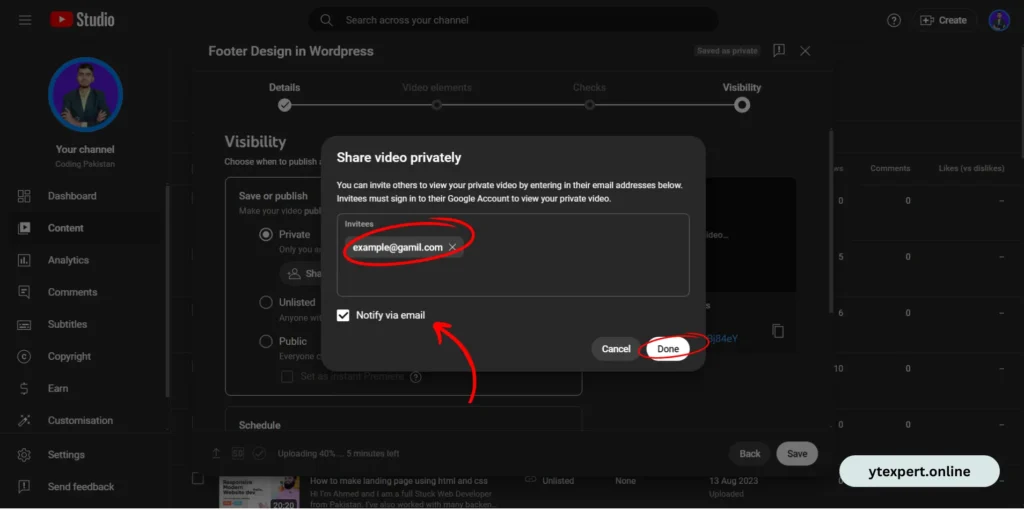
Step 2: Add all email addresses you want to see this video and click the notify via email button.
Differences B/W Public, Unlisted, and Private Videos
| Feature | Public Video | Unlisted Video | Private Video |
| Visibility | Visible to everyone on YouTube | Not visible to the public, only via direct link | Only visible to the creator and invited users |
| Searchable | Appears in search results and recommendations | Does not appear in search results or recommendations | Does not appear in search results or recommendations |
| Sharing | Can be shared freely by anyone | Can be shared by anyone with the link | Can only be shared with specific invited users |
| Embed Option | Can be embedded on websites | Can be embedded on websites | Cannot be embedded |
| Comments & Engagement | Comments, likes, and dislikes enabled | Comments, likes, and dislikes enabled | No comments, likes, or dislikes |
| Monetization | Eligible for monetization if the creator is part of the YouTube Partner Program | Eligible for monetization if the creator is part of the YouTube Partner Program | Not eligible for monetization |
| Audience | Open to the general public | Intended for a limited audience, accessible via link | Intended for a very limited audience, selected by the creator |
| Channel Page Display | Can be embedded in websites | Does not appear on the channel page | Does not appear on the channel page |
Related Content
- How To See How Much Time You Watch Videos On YouTube
- Top 5 YouTube Gurus in India You Must Follow
- Top 5 Ways To Earn Money From YouTube Without AdSense
Conclusion
Understanding the differences between public, unlisted, and private videos on YouTube is essential for managing your content effectively. Public videos are perfect for reaching a broad audience, allowing anyone to discover and engage with your content.
Unlisted videos offer a middle ground, providing the flexibility to share content with specific people without making it fully public.
Meanwhile, private videos offer the highest level of control, keeping your content visible only to those you specifically invite. By choosing the right visibility option, you can tailor your YouTube content strategy to suit your goals, whether it’s for wide distribution, limited sharing, or confidential access.